

Document Verification Error (TXT Record Verification Error) – Troubleshooting Guide
Overview
The error shown typically occurs when there is an issue with the TXT record value used during document verification.
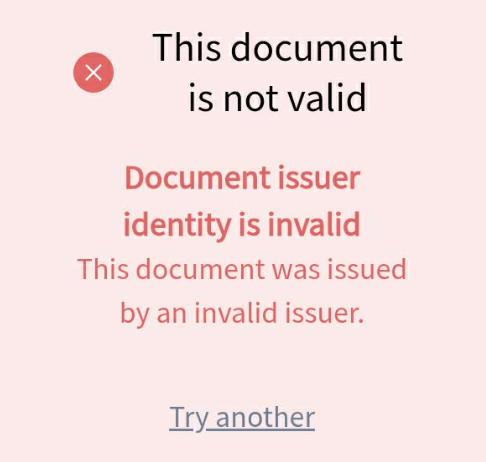
Possible Causes & Solutions
1. Incorrect TXT Value Configuration
This issue may occur if:
- The TXT value was not copied correctly.
- Spaces or unintended characters were added during creation.
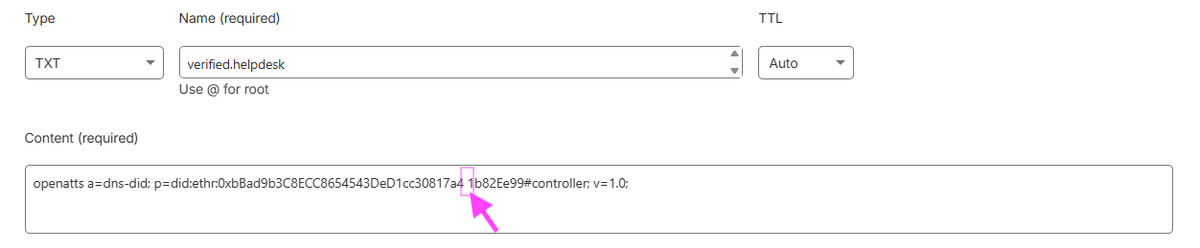
Solution:
- Client: Contact FilPass Support for immediate assistance
- Internal: Escalate to the Operations Manager
2. TXT Record Deleted
If the error suddenly appears after previously working, the TXT record may have been accidentally removed.
Solution:
- Client: Contact FilPass Support for immediate assistance
- Internal: Escalate to the Operations Manager
Notes:
- Always ensure the TXT value is copied exactly as provided
- Avoid adding spaces or modifying any characters
- Verify that the TXT record remains active in your DNS settings
Was this helpful?