

How do I share my eCredentials?
FilPass allows recipients to securely share their Verifiable Credentials (VC) using multiple sharing methods. These sharing options help recipients distribute credentials professionally while maintaining security and privacy controls.
To access the sharing options:
- Go to Documents
- Locate your credential
- Click the Action Menu (⋯)
- Select Share VC
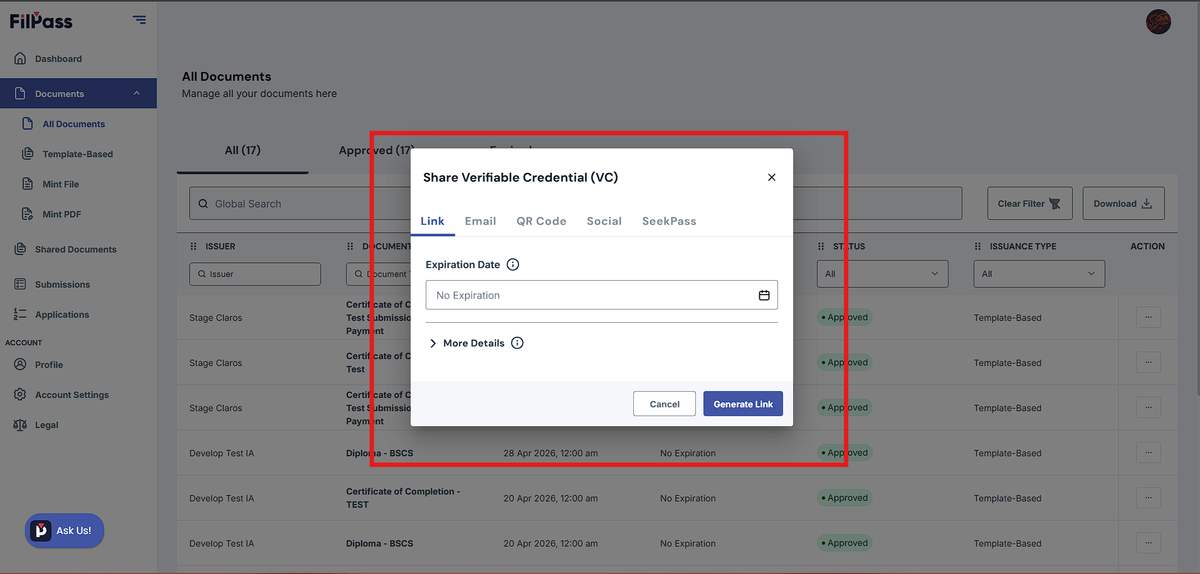
The “Share Verifiable Credential (VC)” window will appear with multiple sharing options.
Available Sharing Methods
1. Link
Generate a secure shareable link to your credential.
Available Options:
- Set expiration date or No Expiration
- Hide Email
- Hide QR Code URL
- Hide Tab Details
- Add Purpose
- Add Requester’s Name
Steps:
- Open Share Verifiable Credential (VC)
- Select the Link tab
- Configure your preferred sharing options
- Click Generate Link
Best For:
✔ Sharing through chat or messaging apps
✔ Sending credentials quickly
✔ Embedding credential links into documents or websites
2. Email
Send credentials directly through email.
Available Options:
- Set expiration date
- Privacy controls
- Add Purpose
- Add Requester’s Name
- Add custom message
- Send to multiple email recipients
Steps:
- Open Share Verifiable Credential (VC)
- Select the Email tab
- Enter recipient email addresses
- Configure sharing preferences
- Click Send or Share
Best For:
✔ Employers
✔ Schools or institutions
✔ Professional credential submissions
3. QR Code
Generate a scannable QR Code linked to the credential.
Available Options:
- Set expiration
- Hide Email
- Hide QR Code URL
- Hide Tab Details
- Add Purpose
- Add Requester’s Name
Steps:
- Open Share Verifiable Credential (VC)
- Select the QR Code tab
- Configure sharing preferences
- Click Generate QR Code
Best For:
✔ Printed certificates
✔ Events and seminars
✔ Fast in-person verification
✔ Presentations and IDs
4. Social
Share credentials through supported social platforms.
Available Platforms:
- LinkedIn (“Add to Profile”)
Steps:
- Open Share Verifiable Credential (VC)
- Select the Social tab
- Choose your preferred platform
- Continue with the sharing process
Best For:
✔ Professional recognition
✔ Portfolio building
✔ Public achievement announcements
5.SeekPass
Store and manage credentials using SeekPass.
SeekPass is a secure digital credential wallet that allows recipients to store and manage supported credentials for future verification and sharing.
Important Requirement ⚠
SeekPass sharing is only available for credentials under these Document Categories:
✔ Education
✔ Microcredential
Supported issuance types:
✔ Template-Based
✔ Mint PDF
✔ Mint File
If the credential category is not supported, the SeekPass sharing option may not work properly.
Steps:
- Open Share Verifiable Credential (VC)
- Select the SeekPass tab
- Click Add to SEEK Pass
- Complete the process in SeekPass
Best For:
✔ Long-term credential storage
✔ Digital credential management
✔ Easy verification and sharing
Security & Privacy Controls
Most sharing methods include privacy and security options such as:
- Set expiration dates
- Hide sensitive information
- Customize sharing details
These controls help ensure secure and professional credential sharing.
Important Notes
❗SeekPass only supports Education and Microcredential categories
❗Unsupported Document Categories cannot be shared to SeekPass
✔Privacy controls may vary depending on the sharing method
✔Generated links and QR codes may expire based on selected settings
Best Practice 💡
Before sharing credentials:
- Review your privacy settings
- Set expiration dates when necessary
- Use SeekPass for long-term credential management
- Verify that your credential category supports SeekPass
Common Questions:
Q: Why can’t I share my credential to SeekPass?
A: The credential’s Document Category may not be Education or Microcredential.
Q: Can I share credentials without expiration?
A: Yes. Some sharing methods allow selecting No Expiration.
Q: Can I hide sensitive information while sharing?
A: Yes. Privacy controls are available for most sharing methods.
Q: Does SeekPass support all issuance types?
A: Yes. Template-Based, Mint PDF, and Mint File are supported as long as the Document Category is eligible.