

What is the Recipient Dashboard?
On this page
What is the Recipient Dashboard?
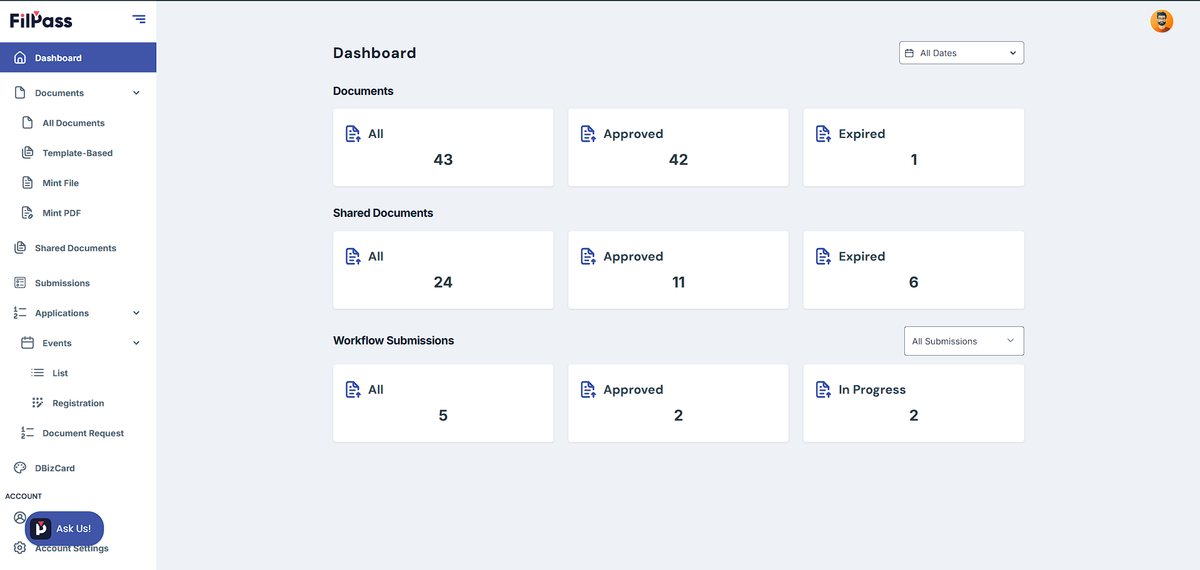
The Recipient Dashboard is the homepage of your FilPass account. It provides a quick overview of your documents, shared credentials, and workflow submissions, allowing you to easily monitor the status of your activities from one central location.
The dashboard is organized into several sections that help you quickly access important information and navigate to other modules within the platform.
Dashboard Sections
Documents
The Documents section provides a summary of all credentials issued to your account.
You can quickly view:
- All – Displays the total number of documents available in your account.
- Approved – Shows documents that have been successfully issued and are ready for viewing or sharing.
- Expired – Displays documents that have already reached their expiration date.
Clicking any of these summary cards will take you directly to the corresponding document list.
Shared Documents
The Shared Documents section provides an overview of credentials you have shared with other people or organizations.
You can monitor:
- All – Total number of credentials you have shared.
- Approved – Shared credentials that are currently active.
- Expired – Shared credentials whose sharing access has expired.
This allows you to quickly monitor the status of your shared credentials.
Workflow Submissions
The Workflow Submissions section displays the status of your submitted workflow applications.
Available summary cards include:
- All – Total number of workflow submissions.
- Approved – Applications that have been approved.
- In Progress – Applications that are still being processed.
Use the Submission Type dropdown to filter the dashboard by a specific workflow submission type.
Navigation Menu
The left navigation panel provides quick access to all Recipient features.
Dashboard
Returns you to the main dashboard where you can view document summaries, shared documents, and workflow submissions.
Documents
Manage all credentials issued to your account.
Available sections include:
- All Documents
- Template-Based
- Mint File
- Mint PDF
Shared Documents
View credentials that you have shared with others and monitor their sharing status.
Submissions
Access all workflow submissions linked to your account.
Applications
View and track your submitted applications.
Events
Access available events and manage your registrations.
Available sections include:
- List – Browse published events.
- Registration – View events you have registered for.
Document Request
Access available document request forms and submit requests to participating organizations.
DBizCard
Manage your digital business card (if enabled by your organization).
Account Settings
Manage your personal account information and preferences.
From here, you can:
- Update your profile information
- Change your password
- Manage your account settings
Dashboard Filters
The Date Filter located at the top-right of the dashboard allows you to filter dashboard statistics based on a selected date range.
Key Benefits
The Recipient Dashboard helps you:
- View all issued credentials in one place.
- Monitor shared document activity.
- Track workflow submission progress.
- Access events and document requests quickly.
- Navigate easily to different Recipient modules.
- Stay informed about your document and application status at a glance.